


Shopify website development covers store setup, theme design and development, custom apps, integrations, migration and ongoing maintenance. Your project might be a first store, a redesign of a store that already takes orders, or a connection between Shopify and the systems that fulfill them. The useful starting point is the change your business needs.
Two proposals can both promise a “Shopify store” and buy very different work. One might configure a purchased theme and import a clean catalog. Another might build new product templates, connect a warehouse and test how orders recover when an update fails. Compare the deliverables before comparing the fees.
Public offers show that distinction: one US freelancer advertises catalog and launch setup from $1,200 and a custom Liquid theme from $6,500. These are separate advertised starting prices from one seller. Your quote depends on your catalog, features and required tests, with plan payments, apps and support accounted for separately.
This guide helps you decide what to configure yourself, what to commission and whom to hire. Use the service map to define the job, the cost worksheet to compare proposals and the launch checks to agree what must work before you sign off.
What do Shopify development services include?
A Shopify development proposal should name the store setup, theme, app, integration, checkout or migration work included, plus testing and handoff. Technical SEO, performance and maintenance need explicit deliverables too. Start with the shopper or staff task you need to improve, then ask the provider to show how you will accept the result.
12 of 20 facts
that a shopping engine checks were missing from one live Shopify product page. The theme template decides which facts reach the public HTML.
12 missing 8 present
For a new store, that could mean loading a catalog, configuring shipping and placing a test order. For a live redesign, it could mean changing the product template while preserving product URLs, subscriptions and order routing. Identify which work the merchant supplies, which the developer builds and who approves launch.
| Need | Work | Acceptance test |
|---|---|---|
| New store | Catalog, theme, payments and shipping | Place an order with the expected delivery option. |
| Product page | Templates, sections or app setup | Edit a detail and verify the selected variant. |
| Inventory | Connector or custom integration | Reject, retry and reconcile an update. |
| Migration | Data, redirects and cutover | Reconcile records and send an order to fulfillment. |
| Retail POS | Locations, stock and returns | Check stock after a sale and return. |
| Checkout | Supported checkout configuration or extensions | Verify the required step on the intended Shopify plan. |
| Technical SEO | Redirects, indexability, product markup and template performance | Check the live URLs, product facts and agreed performance baseline. |
| Maintenance | Updates and incident response | Identify the owner and test the support route. |
Where to start
If scope is still uncertain, start with build paths. If you already have proposals, compare their first-year costs before shortlisting a provider.
Shopify store design services and store setup
Configuration uses a feature your store already has. A merchant can set a shipping rate for a zone or reorder a homepage section in the theme editor. Development changes what the store can do. If a product needs a selector that tells shoppers which replacement part fits their equipment, someone has to decide where those records live, build the selector and test what happens when the compatibility data is incomplete.
In Shopify’s theme editor, selecting a section shows the settings that section supports. The example below has Image banner selected: the template structure is on the left, and its image, height and layout controls are on the right. Ask the provider to show where a staff member will make your routine edit. A setting the theme already exposes may need configuration; a missing section or behavior needs a separate development scope.
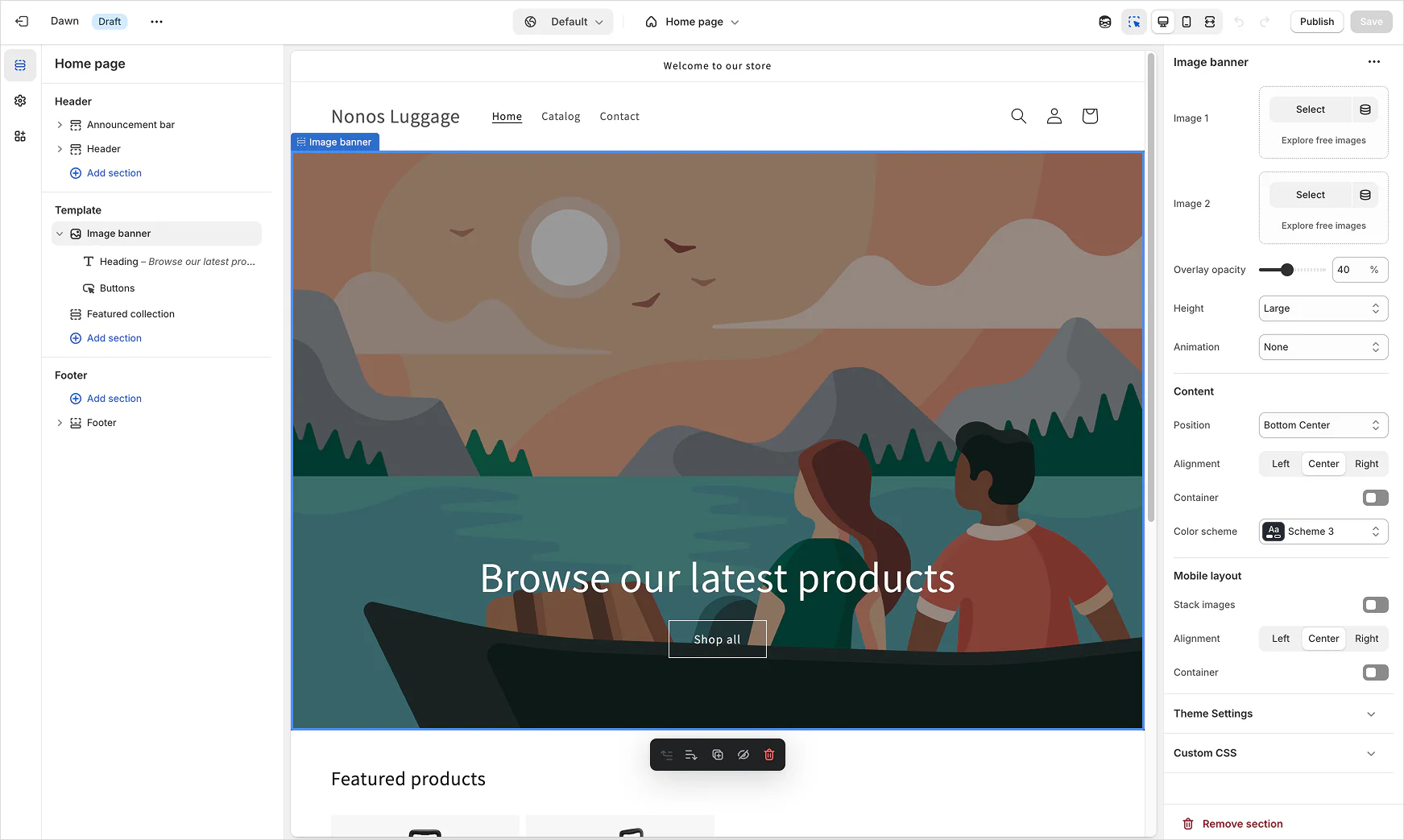
On a new store, give the provider a representative catalog before design begins. Include three product types so the theme is tested against the cases that break layouts:
- a product with several variants,
- an item that ships under a special rule,
- an item that is out of stock.
Then agree who owns the data work: who writes descriptions, who cleans the product spreadsheet and who supplies imagery. “Import products” can mean uploading a clean file, or repairing missing SKUs and variant relationships first, so ask the provider to price the work your file actually requires.
Shopify web development services for themes and integrations
For a redesign, list the templates shoppers depend on and the workflows staff need to keep. A theme update might change how size information appears. The same proposal could also include replacing a review app or changing how the warehouse receives orders. Give those changes separate lines. A visual approval can cover the theme. An integration needs a test record that makes it through both systems.
Ask what the merchant can change without a code release. If the launch includes a product comparison section, have a merchandiser add a test product and update a comparison fact in a test store. A demo built with hardcoded product content leaves the team with a recurring development job. Give the supplier an example of a change you make every week so both sides can see how routine work will happen.
Technical SEO and performance in a Shopify build
Include redirects, indexability, product structured data, template performance and analytics checks in the development scope when the build changes those parts of the store. Ask who tests each item and who monitors it after release. A redesign can preserve a product URL and still change its canonical tag or remove useful product information. Use the launch acceptance checks to name the pages and records the team must inspect.
Quote ongoing keyword research, content, link acquisition and conversion experiments as separate work with their own owners. If an agency includes SEO in its proposal, ask for the specific deliverables and reporting period. A theme release can be accepted against working pages and measured tests; search ranking changes need observation after launch.
Catalog and URL migration
Define which records move, what gets archived and where staff will look up old orders. Keep a reference set with products and variants, a customer record permitted for testing, and an order with a refund. After a rehearsal, reconcile counts and inspect the reference records individually.
Give every valuable old URL a destination and a named owner. If a product is retired, decide whether a replacement page answers the same need before assigning its redirect. The broader guide places these tasks in the sequence of a full build. Ecommerce website development guide
POS inventory, returns and reconciliation
If the project touches Shopify POS, name each physical location and decide which system owns stock counts. Rehearse a sale and a return for the same SKU at a test location. Check that the record reaches the system used by accounting and that the return goes back into the right inventory bucket. If online orders can be collected in a store, include a pickup order and a cancellation. Ask the person closing out the register to confirm they can recognize each transaction.
Starting prices for Shopify web design and store setup
Compare what each offer would deliver before you use its price in your budget. These US listings give you three ways to describe a project. Ask for a quote against your own catalog, integrations and launch tests.
Advertised starting prices for three different scopes from two US sellers on Contra. Compare the listed deliverables with your project before using a price in your budget.
If your store needs both a new theme and warehouse changes, ask the bidder to price both against the same test order. The next section shows how to decide which work belongs in Shopify’s theme and which needs its own integration.
When do you need a custom Shopify theme, an app, or headless?
Start with an existing Shopify theme if it supports the templates staff need to edit. Scope custom Liquid when key product layouts or editing workflows require new templates or sections. Use an app or integration for a specific business workflow. Consider headless when a storefront requirement justifies operating a separate frontend.
Choose a path based on who will run the store after launch. Use the briefs below to test the choice with a job your team already does.
First store, one shipping location
- Starting scope
- Configure the theme for a standard variant catalog and let the merchandiser reorder homepage sections.
- Expand scope when
- The editor cannot support a per-product compatibility chart with an empty state.
- Acceptance demo
- A test checkout to the intended destination. For the chart, have the merchandiser add and remove it on one product in a test store. Check that a second test product stays the same.
Live redesign with a subscription app
- Starting scope
- Build on an unpublished theme copy. Keep existing product handles and order routing.
- Expand scope when
- The new cart cannot pass the incumbent app’s subscription checkout. Price the integration separately.
- Acceptance demo
- Run a known subscription item through the new cart and checkout. Compare its route and an existing product URL with the current theme.
Stock at two warehouse locations
- Starting scope
- Test the connector against an order that must route to East while West stock stays unchanged.
- Expand scope when
- The connector loses order identity, applies the wrong location or cannot recover from a missed cancellation.
- Acceptance demo
- One order through the duplicate and missed-event rehearsal. Inspect East and West in the warehouse.
Commerce inside an existing frontend
- Starting scope
- Test headless when one existing application must keep its own product pages and let shoppers move from those pages to a Shopify cart.
- Stay with a theme if
- A linked Shopify storefront meets the requirement. Keep one release path and let merchandising work in Shopify.
- Acceptance demo
- Open a variant link directly. Check the public HTML for its price and stock. Move the selected item from the application to checkout and verify that the cart retains it. Name who can roll back the frontend.
For an integration brief, give the candidate the warehouse rehearsal below and ask them to bring an example log showing which system accepted each change.
What Shopify theme development services should deliver
A purchased theme can be enough when it supports your core templates and the merchant can configure the sections. Test the hard product first. If you sell apparel, try a product with several colors and sizes, a size guide and stock that differs by size. Check whether a color change updates the imagery and whether an unavailable size remains understandable. Bring the person who updates products into the preview so the proposal reflects how work will be done after launch.
When custom Shopify theme development is worth scoping
A custom Liquid theme makes sense when core templates or editing patterns need to be built around the catalog. A supplier might need a product template that presents a compatibility chart for replacement parts and a different one that presents dimensions and care instructions for furniture. Ask the supplier to list which templates and sections are new, which are reused, and which merchant fields power them. Include empty states. If a new product has no compatibility table yet, the page should show the intended fallback without leaving a stray heading.
Give the team two edits. In a test store, ask them to add a size guide to a test product and check where it appears. In the draft theme, move a campaign section and check that unrelated pages keep their layout. Separate theme settings from product fields. An unpublished theme preview can still read live product data. For the product detail brief, use this guide to writing product facts that AI answers can quote.
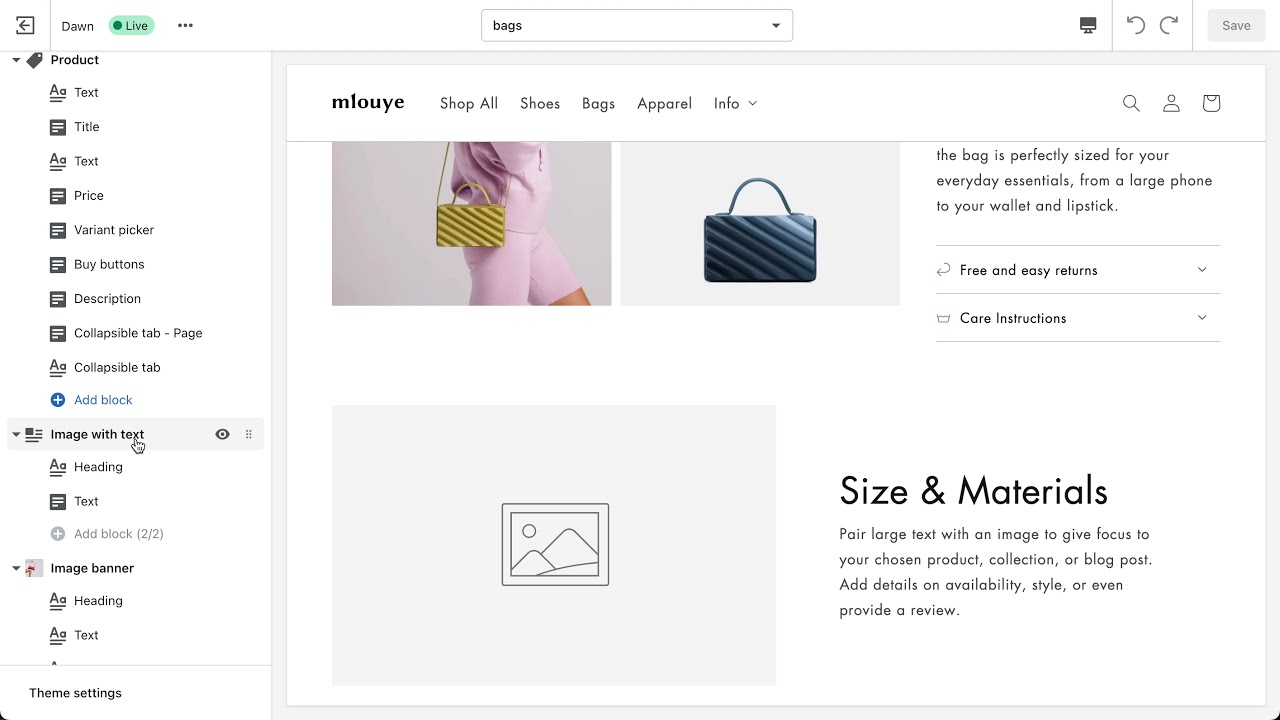
Keep product-specific information in the catalog fields that supply the template. Shopify’s example below stores Materials on a product as Linen, Cashmere and Cotton. A compatible theme setting can connect to that field as a dynamic source. Have the developer show which field powers your size guide or compatibility table, then change one test product and verify the second product keeps its own values.

When an app or custom integration fits
Configure an existing Shopify app when it supports the workflow and the records your systems use. Commission a custom integration when a required rule or failure path calls for behavior the connector cannot provide. A subscription app may cover a standard purchase and renewal. An inventory connector may be enough if the two systems already exchange the fields you use.
Ask the provider to run a normal event and an error. For a stock update, show the source record, the quantity written to the store and the alert if the target rejects it. A provider who can explain the retry and reconciliation path can tell you how the store will recover on a busy day.
Custom development becomes easier to evaluate when you describe what an existing app cannot handle. Suppose orders from one channel must reach a warehouse with a particular location code, and the connector can only apply one default. Ask for a demonstration with two channels, each with a different code, and a replay of the same message. The warehouse should receive the intended location, and replaying an event should leave a single order in the system.
An app built for public listing has onboarding, support and distribution work that a merchant-specific integration may never need. For an app commissioned for your store, ask how it will be distributed, who controls the hosting and app account, and which permissions it needs. Keep permissions tied to the workflow. If it only reads product records, ask the developer to explain any request to write orders. Specify where failed events are visible, who can retry them and what happens when you replace the vendor.
Separate the person who can read a queue from the person authorized to retry it. Ask what happens if the warehouse accepts the record and its acknowledgment never reaches Shopify. If the integration sends the order again, the warehouse must recognize it as the same order. Have the supplier name the order key it uses and show the result in the warehouse, where an extra order would actually be picked.
Historic Environment Scotland put Shopify inventory, warehouse fulfillment and mobile point of sale in its retail systems procurement. A sale at a pop-up and an online order can both affect the units available to sell. The buyer has to establish which system keeps the count and how the supplier will prove the systems agree. That is integration work even if the storefront design stays the same.
Integration to Shopify to have a fully managed stock ecosystem
- Stock owner
- Which system owns the available quantity at each location?
- Record match
- What links a Shopify variant and location to the correct warehouse item?
- Acceptance
- What does each system show after a sale, a duplicate update and a return?
The award notice describes the job. To turn a stock requirement into a bid, give each supplier the same location list, the same sample item and the same expected ending quantity. Name the people who can approve changes to warehouse stock and who will reconcile a discrepancy. Those answers let the provider price the recovery work alongside the first connection.
Shopify Plus development and checkout extensions
Shopify Plus is required for checkout UI extensions on the information, shipping and payment steps. An extension that runs after purchase has different availability rules. Ask the provider to name the exact step, the extension target and the minimum plan for the work. A proposed post-purchase survey and a field on the shipping step need separate answers.
For wholesale, distinguish a B2B market catalog from one assigned directly to a company location. Basic, Grow and Advanced can assign catalogs to B2B markets. Shopify Plus can also assign a catalog directly to a company location. If your scope needs that control, test with a buyer from the intended location and another buyer who should see the market catalog instead. If the requirement is a branded product template, price a theme build before adding a Plus implementation.
Give both bidders a two-buyer test. A wholesale buyer at an approved company location should see the assigned catalog price. If payment terms are in scope, verify the terms configured for that location at checkout. Sign in with a different buyer and place the same item in the cart under the market catalog. Save both totals and check the price survives to checkout. A mock product page with the right discount cannot establish that the actual checkout uses it.
When to operate a separate headless frontend
Choose headless when commerce must run inside a separate frontend and a named team can host, deploy and monitor it. An existing application that must serve editorial and product pages may justify that work. Shopify still handles commerce, and the frontend team owns the connections that keep the catalog, cart, accounts and checkout working. A request to make an ordinary theme faster gives you a smaller test first. Measure the current template, identify what delays it and price the fix.
Ask the supplier to show an unpublished version that includes:
- a real catalog,
- an unavailable variant,
- a working test checkout.
Name the person who can roll back a frontend release and the person who investigates if the storefront shows different stock from Shopify. Have the merchandising team edit an item and see how the change reaches the public page. If a routine edit adds a deployment, decide who will take responsibility for that release.
How much do Shopify development services cost?
Two US providers on Contra advertised Shopify catalog and launch setup from $1,200, a store build with operations setup from $3,500, and a custom Liquid theme from $6,500. See what each of the three offers covers before comparing it with a quote for your store.
For a modeled refresh on an existing Shopify plan, budget $9,200 in incremental first-year costs under these assumptions. The work takes 74 hours at $100 per hour, with 12 months of apps and six months of support. Existing plan charges and applicable taxes are separate.
What affects Shopify website design cost?
Ask any supplier who quotes a fixed fee to list the product templates, app configuration, tests and support included. A setup package may fit a clean catalog when the theme already provides the sections staff need. If the store needs new editorial templates or warehouse testing, price those jobs separately and identify who supplies the data. For a connection to a specific warehouse, ask for a test order that reaches the intended location and a recovery test for an order that fails.
| Work | Published amount and scope |
|---|---|
| Theme customization | $350 to $1,500 in starting prices from two Pakistan-based Contra sellers. Both cover changes to an existing theme. |
| Store projects | $1,200 to $6,500 in starting prices from two US-based Contra sellers. Three distinct scopes, from catalog setup to a custom Liquid theme. |
| Contractor pay | $20 to $73 per hour, with a $35 median, in senior Shopify contractor earnings on Lemon.io across multiple countries. |
The Contra figures are the advertised starting prices of the selected listings on November 5, 2026. Each seller prices additional work for your project separately.
Shopify developer hourly rates and in-house wages
Lemon.io reports contractor earnings. A buyer may also pay for other roles or fees. A quote that includes design, project management and QA should say how each is charged and who does the work.
The US median wage for the broader web developer occupation was $92,650 per year in the 2025 wage data. Use it as context for the employee option. Add the costs your company would bear for benefits, recruiting, equipment and coverage while the developer is away. The financial comparison is between a role you’ll keep staffed and the work you plan to buy over the same period. Compare actual capacity for Shopify work if the employee will support other systems.
Shopify development cost for a 74-hour theme refresh
Consider an existing store that keeps its catalog, plan and fulfillment system. It needs a revised product template, changes to its collection page, app configuration and a documented launch test. Assume the merchant supplies product content, and the provider quotes a blended rate of $100 an hour. Both the rate and the hours are assumptions for this example.
| Item | Basis | Cost |
|---|---|---|
| Scope | 8 hours at $100 | $800 |
| Theme work | 36 hours at $100 | $3,600 |
| App setup | 10 hours at $100 | $1,000 |
| Store QA | 14 hours at $100 | $1,400 |
| Handoff | 6 hours at $100 | $600 |
| Build labor | 74 hours | $7,400 |
| Apps | $50 a month for 12 months | $600 |
| Support | 2 hours a month for 6 months at $100 | $1,200 |
| Year 1 cost | Plan and tax extra | $9,200 |
Use the same worksheet when a provider offers a fixed fee. Ask it to state which rows the fee includes and which costs the merchant will pay separately. The hours in the example explain the price. In an actual fixed-fee contract, acceptance should depend on the agreed outputs. Agree in advance what counts as a defect and how a new requirement gets priced.
The example assumes support for six months. If you need the same coverage after that point, get a price for the remainder of the year. Ask whether unused time carries forward, how urgent work is handled and whether upgrades to paid apps could change the operating bill. A one-time fee has little meaning if it depends on software the merchant needs to keep paying for.
- One-time build
- $7,400
- Apps
- $600
- Support
- $1,200
That share changes who needs to approve the bid. The implementation lead can sign off on the build and the operations owner can accept the recurring commitments. If support is prepaid for six months, ask when unused capacity expires and who takes the queue in month seven. If a required app is billed to the supplier’s account, put transfer of billing and access on the handoff list.
Shopify website costs in year one
For a new store, start with the signed implementation fee, then add the merchant-paid and recurring costs:
- merchant-paid setup work,
- domain and theme licenses,
- the quoted plan payments for the year,
- apps and support,
- applicable taxes.
Add estimated payment and transaction charges separately. Use the payment methods your buyers are expected to use, projected sales and order counts, and the rate terms on your own quote. A variable payment fee changes with sales. A platform subscription follows the billing terms you agree to.
For Plus, create a separate line for the plan proposal, including any minimums or variable charges in the contract. Then price the work that made you consider Plus.
For wholesale, that might include assigning a catalog directly to a company location and testing that its prices apply to the intended buyer. For a checkout change, ask the provider to price the exact extension, its test cases and its ongoing support. If there is also an ERP connection, include the time for both teams to agree on the record format and test how orders and exceptions travel.
Compare the standard and Plus proposals using the same expected order mix and the same definition of a completed project. Record which requirement each option satisfies. If the existing store keeps the same plan, put the common charge in both total budgets or show the incremental comparison separately. Mixing one total budget with one incremental price makes the options look farther apart than they are.
How do you hire a Shopify developer for the work?
Match the hire to the work:
- a freelancer for a bounded change,
- an agency when several disciplines need to work together,
- an employee when the business needs an ongoing Shopify owner and has enough work to keep that role occupied.
A hybrid can work when someone inside the business owns the store and a specialist is needed for a defined part of the build.
Compare who does the work and who owns it
One bounded change
Ask for a preview of the specific change.
Keep acceptance and release ownership inside the business. Agree who can respond if the developer is unavailable.
Several roles
Ask for named delivery staff and coverage.
Keep a merchant decision maker and confirm how the agency will work with your other suppliers.
Continuous work
Ask how development, QA and support time will be staffed.
Give the developer ownership, time to document changes and a backup for urgent incidents.
Bounded work for a Shopify freelancer
A freelancer can build a size guide, add a set of product fields or fix a theme’s variant behavior. These jobs have a testable scope and can usually be tried in a preview. Give the developer your highest-traffic product types and variants, the browsers you support and a clear way to get feedback. Decide who can publish the change and who will handle the next theme update. If the merchant cannot coordinate content, QA or the release, include those tasks before comparing with an agency proposal.
For a narrow problem that is difficult to diagnose, consider paying for investigation with a time cap and a written result. The deliverable might be a reproduction, a candidate fix and a list of files the change touches. Decide whether to proceed once you can see the cause and the effects on the rest of the store. This is especially useful when the symptom appears only on a specific device or when an app and the theme both control the same interaction.
Coordinated delivery by a Shopify agency
An agency can be a fit when a redesign depends on a designer, a theme developer, an integration engineer and someone to run checkout tests. Find out who makes technical decisions and who owns each handoff. Ask whether the people on the pitch will work on the store. If a subcontractor owns the warehouse connection, get a named owner for outages and a place where your team can see the logs. One invoice does not tell you who will resolve a broken order.
Evaluate the agency’s coordination work alongside the code. Ask to see a milestone where theme work and the integration meet. For example, a product changes availability in the inventory system, the storefront reflects the change and the shopper sees the correct purchase options. Confirm whether the agency will coordinate that rehearsal with the warehouse team or expects your staff to do it.
Ongoing work for an in-house developer
Look at the tasks that recur once the initial build is over. Product launches, app updates, merchandising experiments and integrations may give an employee a steady backlog. Review the work you approved in recent release cycles and identify the support time hidden in other teams’ schedules. If an employee will also manage analytics or fulfillment tools, assign realistic time to each role. Plan coverage for holidays and releases that need an independent tester.
When to bring in a Shopify Plus developer
A merchant’s ecommerce lead can own the catalog, theme repository and release decisions while a specialist builds an ERP connector or a checkout extension. Write the boundary into the agreement. The outside provider owns the integration until the agreed tests pass. The internal owner receives documentation, a way to run the deployment and access to the systems needed to operate it.
For a Plus project, look for experience with the specific checkout or B2B workflow in scope. Ask for a demonstration on the extension target or company account that resembles your case.
How do you compare Shopify development proposals?
Compare Shopify proposals at the same scope by pricing omitted work and applying the same recurring costs to both. In the worked example, the $7,400 build with testing and handoff reaches $9,200 in year one. The $5,900 build reaches $9,700 after the buyer adds the omitted testing and handoff at the assumed $100 rate and applies the same app and support costs.
The same written scope for both bidders
A Shopify development statement of work should name the deliverables, dependencies, acceptance tests and process for approving scope changes. Begin with a template inventory. List the product, collection, cart and other pages that are changing.
Give each supplier an example that shows the hardest case. For the product template, send a variant that changes imagery and stock status. For the collection template, send products whose filter values have been entered inconsistently. Ask bidders to specify the work they’ll do on those records and the edits the merchant is expected to make first.
Give the integration its own scope. State which system owns each important record, how quickly the other system must see it and where a rejected update goes. An inventory sync can have one line for setup and another for verifying that a failed update can be retried. When a proposal says “app installed,” ask whether it covers configuration, a test in the merchant’s environment and written instructions for troubleshooting.
Ask the supplier to assign responsibility for product copy, imagery, catalog cleanup and acceptance. If your merchandiser can prepare the data, say what format and date they can commit to. If the work requires a warehouse vendor or an app provider, name who schedules the test and who can approve a release. Keep a separate list of optional enhancements with an estimate or a flag that a price is still due.
Normalizing the $5,900 fixed-fee bid
Assume both fictional bids include discovery, template work and app configuration. Bid A includes the testing and handoff shown in the cost example. Bid B leaves those tasks out. In this comparison the merchant still needs both, so the buyer prices them at the same assumed $100 per hour. Both suppliers work with the same app and support assumptions.
| Scope | Bid A | Bid B |
|---|---|---|
| Quoted build fee | $7,400 | $5,900 |
| Store QA | In fee | Add 14 hours at $100 ($1,400). |
| Handoff | In fee | Add 6 hours at $100 ($600). |
| First-year apps and support | $1,800 | $1,800 |
| Year 1 cost | $9,200 | $9,700 |
| Extras | Ask both bidders about product copy and a second shipping integration if either enters scope. | |
The $1,500 difference in the quoted fees becomes a $500 difference in the other direction. Use the normalized totals as a starting point for a conversation. The merchant might choose Bid B if its own team has the time and skills to do the omitted work. In that case, allocate the hours and name who will run the tests. An available team changes the budget. A task left without an owner changes the risk.
If a supplier’s pricing is unclear, send back the same worksheet with a request to mark each line included, excluded or quoted separately. Put uncertain work below the subtotal with an owner and a date for clarification. You can compare the portions that are priced while keeping the open decision visible. Make sure both suppliers use the same assumptions for review rounds, asset delivery and release support.
A lower quote often leaves out testing and handoff. Enter your two first-year quotes, the hours the cheaper bid omits and your hourly rate to see their true cost side by side. The fields start on the two example bids from this guide, so replace them with your own.
- Bid A
- $9,200
- Bid B, normalized
- $9,700
- Difference
- $500
Bid B normalized equals its quote plus the omitted hours at your rate. Keep apps and support equal in both quotes before comparing.
If your own team can do the 20 hours, use the cost of the capacity you will divert. The decision can change even when the supplier fees stay fixed. If the only person who can run the refund test is already assigned to launch, give that capacity conflict a date and an owner before picking a bid.
What change control and a defect window cover
Agree what counts as a defect before work starts. If the brief says a product’s shipping message must update when a buyer changes variants and that message stays the same, the build has missed an agreed test. If you ask to add location-specific messages after the original scope was signed, get a separate estimate. Write who can approve the change, what it does to the schedule and when the supplier will take it on.
Pin down three things about the defect window:
- how it starts,
- which work it covers,
- where to report a problem.
A checkout defect that prevents purchase deserves a different response from a spelling fix. Define which party diagnoses a problem when an app provider or warehouse system is involved. Put the release plan next to that agreement so everyone knows who can pause a deployment, revert the theme or move a failed order back into the queue.
A scope brief to send to providers
“Quote a refresh of our product and collection templates on an unpublished copy of the current theme. Preserve existing product URLs, payment and shipping behavior, and our inventory integration. Include a preview of a product with mixed stock across variants, a mobile test order and refund, and a staff walkthrough for editing the new sections.
“List build fees, required app charges, support terms and anything we need to supply. Identify who will run the acceptance tests, who can roll back the release and what you will transfer when the work is complete.”
Replace the examples with your store’s highest-value flows. A business with subscriptions should include one enrollment and a renewal test where the environment supports it. A store that offers pickup should include an order that moves from placed to ready for collection. Those requests give both bidders the same job and give the merchant evidence for approving it.
What should you check before hiring a Shopify development agency?
Ask the delivery team to do three things:
- show a comparable Shopify store,
- run a difficult case live,
- explain how they handed a store back to its owner.
The people who will work on your project should explain the decisions they made and show how the merchant can operate the result.
How US merchants can vet a Shopify web development company
Bring one problem from your brief. If it is a catalog problem, ask to see a store whose variants, filters or product templates resemble yours. If it is an integration problem, ask for a project where the team worked with the same type of inventory or fulfillment system. Have the candidate describe what its team owned and what was supplied by the merchant or another vendor. A useful portfolio conversation tells you who would solve your problem.
When a case study mentions performance, ask what changed, which pages were measured and what else happened during the period. A comparison of two builds on the same product template can help you evaluate development work. A site-wide result after a redesign may also reflect changes in marketing, stock or pricing. Ask for the evidence that applies to the work you’re buying.
A difficult case the team can demonstrate
Ask to see how a product behaves when one variant is available and another is unavailable. A preview should show which option is selected and what happens in the cart. For an inventory project, ask the team to reject a test message, find it in the log, fix the cause and replay it. If confidentiality prevents a supplier from using a client store, it can reproduce the behavior with fictional product records.
For a merchant-owned store, ask the provider to describe the collaborator permissions it needs. A theme change and a checkout integration call for different access. Establish the minimum needed and agree when it will be reviewed. A provider can explain the workflow without asking for your password or unrestricted access.
- 5 minutes for a staff edit
Hand the merchandiser a test store. They add a size guide to one test product and confirm a second test product stays the same. - 10 minutes for a failed case
Choose an unavailable variant or a rejected warehouse record. Watch the proposed engineer find the evidence and explain what the store should do next. - 5 minutes for release ownership
Have the person taking over find the previous theme and identify the person who can pause an integration.
A live test with the delivery team and an inspectable result establishes fit for that part of the brief. A video or sanitized walkthrough can justify moving forward conditionally. Write down what you still need to see, who will provide access and when. If the team cannot reproduce a required flow or cannot explain why its records disagree, buy a scoped discovery step before committing to a fixed price for that work.
How to vet an agency for NetSuite or headless work
For a Shopify and NetSuite integration, send a test order to the sandbox and ask the delivery team to show the Shopify order ID and the matching NetSuite transaction. Send the order again, then record a partial refund and reconcile its amount and status in both systems. Ask who approves corrections if the replay creates a second record or the refund fails to sync.
For a headless project, have the named frontend owner deploy a test release and roll it back. Before and after the rollback, open a direct link to the same variant and carry it through the cart into checkout. Record how the team handles a release that breaks the checkout handoff. For an enterprise Shopify Plus project, ask the proposed release lead and commerce owner to run the rehearsal together. Agree who can halt a release and who covers each handoff if the primary engineer is unavailable.
Scope, owners and support in writing
Ask who will make design decisions, write the integration, run QA and answer an incident after launch. If your contact is a project manager, find out how the team will bring a developer into a discussion that affects scope. Ask who signs off on the preview and where the evidence for sign-off is stored. The person who takes over the store should be able to find test results and deployment notes later.
Review the proposed support model. Ask what happens to an existing ticket if the engineer who wrote the code leaves the team. Look for a place where work is documented and a clear route for urgent incidents. Compare the actual coverage with the hours when the business sells and fulfills orders.
Who owns launch SEO and conversion measurement?
Put launch SEO and conversion tracking on the statement of work if the agency is responsible for them. Give the developer the redirect map, the indexability checklist and the events that should fire. Assign the merchant or analytics lead to approve the results and review the numbers after release. Quote ongoing SEO, content work and conversion experiments separately. They require continuing ownership, even when the developer also provides support.
How to shortlist Shopify partners in the Partner Directory
Use the Shopify Partner Directory to find providers by the work you need. Start with store build or redesign for a storefront project, theme customization for a bounded presentation change, or custom apps and integrations for a systems problem. Filter by location or service when that affects collaboration or support. Check whether the listed capability matches the job and ask for a comparable example.
Send the same brief to each candidate and use the same questions in the follow-up. Compare who understood the requirements and identified a dependency before quoting. A supplier that asks about ownership, stock updates and test orders can explain how those decisions will affect the work. Record where you still need evidence before you choose.
What should you test before approving a Shopify build?
Rehearse a mobile purchase, reconcile an integration failure and match the selected product’s visible offer to its structured data. Give each check an owner, an expected result and somewhere to record the evidence. A test passes when the merchant can see the right outcome in the storefront and in the systems that will process the order.
- CHECKOUTMerchant and QA complete a mobile test order and refund. Payment, inventory and the customer notification reflect the outcome.
- OPERATIONSIntegration owner rejects a test inventory message and replays it. The target ends with the expected quantity and a single processed event.
- URLSMerchant and developer check a high-value old product URL. It reaches the correct public destination, which returns a successful response.
- ACCESSQA selects a variant with keyboard and touch. Focus stays visible, the selection updates and errors identify the affected control.
- PRODUCT DATADeveloper matches the selected variant’s SKU, price and stock status across the page and its Product markup. Check the feed if it is in scope.
- RELEASERelease owner rehearses restoring the previous theme and names who will handle records written while the new version was live.
How to rehearse mobile checkout, refunds and analytics
Use the store’s approved test environment and pick a product with the shipping or discount rule that is easiest to get wrong. Select a variant, add it to the cart and place an order. Record the variant, discount, shipping option, tax treatment and expected total. Then check the order in Shopify and the system that receives it. The storefront can look correct while the order reaches fulfillment with the wrong SKU.
Test a declined payment or other supported failure path. Make sure the customer can understand what happened and retry safely. For a successful test order, rehearse a cancellation or refund and confirm how stock should change. Check which notifications are sent and what the customer sees. If your build offers subscriptions or pickup, test those paths on their own. The normal shipping checkout does not exercise their rules.
If analytics is in scope, record a test order ID and confirm that your reporting receives the intended purchase event. Check what happens when the confirmation page reloads or the same event is delivered again. The goal is one counted order for one completed transaction. If the merchant uses a consent banner, verify the expected behavior under its chosen consent settings and record which browser and state were tested.
Before a redesign, record one comparison point such as the share of shoppers who begin checkout and reach the shipping step. Verify that begin_checkout and add_shipping_info reach the intended property, then record the period, device group and traffic included. Give the merchant’s analytics lead the baseline and a post-launch review date. The GA4 Checkout journey report shows how those events populate the steps.
How to verify inventory sync and redirected URLs
Start with a known quantity and a test SKU. Change stock in the system that owns it, then check what the storefront exposes and what staff see at the fulfillment location. Repeat with a failure. Send an update the target cannot accept, find the event in the log and confirm an alert reaches a person who can act. After the cause is resolved, replay the event and reconcile the final quantities. Write down which record you would correct if the systems disagree.
Mark a sandbox order as shipped in the warehouse and confirm Shopify shows the matching fulfillment, tracking number and expected customer notification. Hold the update for a second test order past the agreed reporting window. The operations owner should see it flagged, recover the update and check that Shopify shows one fulfillment for that order.
For a migration, rehearse the changes that arrive after the first export. Create a paid order, record a partial refund and adjust stock while the old store still owns checkout. Agree on a cutover time and how to capture the final changes.
Before switching checkout, reconcile the order ID, refund amount, open fulfillment and stock by location across the two stores. If a record is missing, pause the switch and keep the old checkout in charge until the release owner can reconcile it.
If a rollback is needed after the new store takes orders, pause its checkout and reconcile the orders, refunds and stock changes it already accepted. Reopen the old checkout only after the release owner approves the transfer of those records and confirms that just one store can take new orders.
For a migration or redesign that changes paths, select old URLs from your best-selling products. Include a discontinued product and a URL people use to find a collection. Follow each redirect to its destination, check that the destination is useful and record any redirect chains or errors. Then compare the page’s canonical URL to the address you want indexed. Keep a list of URLs that need a decision after launch, especially when a product is retired and has no close replacement.
Have the release owner verify that the live URLs intended for search can be crawled and indexed. Check for temporary noindex settings and crawler blocks carried over from staging. Open the production sitemap and inspect a representative product and collection. Give the merchant the sitemap location and a list of URLs to monitor after launch. These are checks the team can demonstrate. They are separate from the time it takes a search engine to process the move. Google Search Central site-move guidance
Require these three duplicate and out-of-order delivery tests before launch. Each names the event to inject, the result that passes and who signs it off. Stock starts at seven units East and four West on one SKU.
01A paid order is delivered twicePass: one reservationEast 2 reserved, 5 available · West 4
Inject the paid notification, then send the identical delivery again. The integration must hold the reservation at two units by treating the repeat as a duplicate. It should find the order by shop and Shopify order ID and ignore the repeated delivery ID. Owner: the integration developer.
02A cancellation never arrivesPass: reservation releasedEast 0 reserved, 7 available · West 4
Cancel the order but suppress its notification in the test. The integration must reconcile against the current Shopify order state and release the reservation, after confirming the warehouse has not started picking. Owner: the fulfillment lead.
03An older update arrives latePass: newer state keptEast 0 reserved, 7 available · West 4
After the cancellation, deliver the earlier paid state under a new delivery ID. The integration must keep the newer cancellation and not reopen the order, checking current state before any replay. Owner: the integration developer.
The delivery ID tells the integration whether it has seen a particular delivery. The shop and order ID tell the warehouse which order it may change. Capture both in the log you inspect. Check West after each step. A connector that also updates West fails the location test even if East’s count is correct. If picking has already started, route the cancellation to the fulfillment lead for a decision before releasing units back to sellable stock. Include a name and a response window for that exception.
How to check accessibility and performance
Run the purchase path with a keyboard. Check that focus is visible, that a shopper can change a variant and that an error points to the field that needs attention. Test the same controls with touch on a phone. The W3C’s WCAG 2.2 minimum target size criterion specifies 24 by 24 CSS pixels, with exceptions such as sufficient spacing. Measure the actual target and test how it behaves.
A reported issue in the Dawn theme describes a large visible label with a much smaller radio input. Check what the label activates and how a shopper selects it by touch or keyboard.
Choose the product, collection and homepage templates you will measure before and after the build. A preview lab test helps isolate a change. Repeat it under the same conditions and record what was enabled, including apps and consent state. Field measurements describe what shoppers experienced.
Google’s good Core Web Vitals targets are Largest Contentful Paint at or below 2.5 seconds, Interaction to Next Paint at or below 200 milliseconds, and visual stability (CLS) at or below 0.1 at the 75th percentile. Separate mobile and desktop. Put the baseline, the pages tested and the post-launch monitoring owner in the acceptance notes.
How to match a Shopify variant to structured data
Match the selected Shopify variant to its Product offer by URL or SKU, then compare the storefront’s price and availability with the public HTML. Open a product with several variants so you can test a different stock state. A product can expose several offers, each with a different stock state. If your team also maintains a feed, check its entry for the same variant. Google’s merchant listing documentation describes how offer data can be used in product appearances.
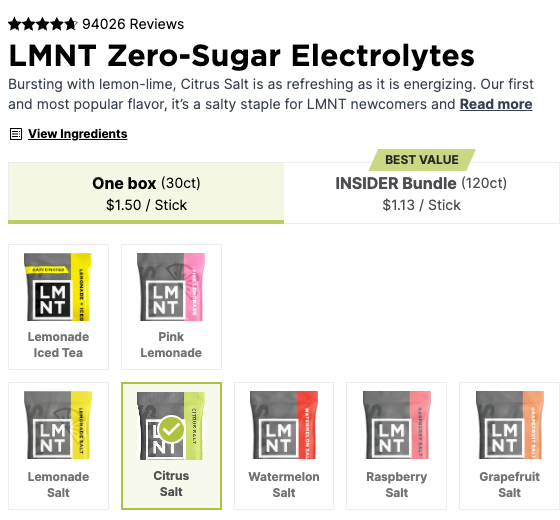
The box price matches the $45 Citrus Salt offer. The raw markup also contains a $45 offer for Lemon Habanero, with a different SKU and stock state. Matching on price alone would miss the difference. Use this test on a product where stock changes across variants and repeat it after an app or template update that touches product information.
Read the markup as one part of acceptance. Shoppers can see details in the page, and Google can use eligible product markup for merchant listings. Your contract can require consistent public offer data and a repeatable test. Keep any visibility or ranking target separate from the test the developer can demonstrate on release day. If a storefront needs to support AI shopping, the guide to how shopping agents compare products explains why a readable product page and a working purchase path are separate checks.
Before approving a template for the whole catalog, test products with different attributes and stock states. A public audit across a full product catalog shows how a store-level review can uncover inconsistent product facts that one example would miss.
What should a Shopify developer hand over after launch?
A Shopify developer should hand over merchant control of the admin, domain, source repository, and accounts that run apps and integrations. Ask for a tested release and rollback path and a named support owner. Test the handoff while the people who built the store can still explain the parts that are difficult to replace.
Store ownership, access and billing
Confirm control of merchant accounts. Open Shopify admin with a merchant-owned account. Verify billing, the primary domain, app subscriptions and the access granted to outside collaborators.
If a partner built a new store for you in a client transfer store, schedule the transfer before launch and verify the merchant can manage the store once it is accepted. If the project worked in your existing store, confirm the merchant still owns the account and review the provider’s collaborator permissions. Check the registrar separately. A domain can resolve correctly even when the person who manages the registrar account is unavailable.
Record the owner, backup contact and billing method for each important service, including:
- paid apps,
- the shipping connector,
- analytics,
- any hosting a custom app or headless frontend needs.
Where possible, invite the merchant into the owning organization with an account it controls. Document the transfer and where the owner can manage access. Keep secrets in the approved credential system.
Source code, app credentials and operating notes
Release a change from the merchant’s repository. Have a member of the merchant’s team make a small change in the repository, follow the release instructions and verify the result on a test store.
The repository should identify the published version and contain the code and instructions needed to build and release the theme. If the project uses branches tied to Shopify, document which branch or process maps to preview and production. Give the merchant a copy of relevant design files, dependency and license notes, and instructions for making future edits.
Ask the merchant to run the rehearsal. If a vendor transfers a GitHub repository, check branch settings, webhooks and deploy keys in the receiving account. GitHub’s repository transfer documentation explains which settings and credentials can carry over. Verify which credentials the merchant needs to rotate before its first release.
Review the signed agreement for rights to use, modify and deploy the work and to share it with a replacement provider. List which themes, fonts or app components have separate licenses and who can renew or transfer them. Then verify separately that the merchant can access the repository and deploy from its own account.
For integrations, request a diagram or short operating note showing the systems, the records they exchange and where errors appear. Include who owns each API credential and what must happen when it expires or is rotated. Choose a failed event and have the new owner find it, explain what it means and identify the approved retry. Confirm who contacts the warehouse or app vendor if the failure is outside Shopify.
- 01 · RepositoryRecord the change
Update the size-guide block’s fallback code in the merchant repository. Record the commit and last working theme version.
- 02 · PreviewCheck both templates
Open a collection and two products in a test store. One product has a size guide and one has an empty field. Check the fallback and the collection layout.
- 03 · ReleaseTest the rollback
Return to the previous theme if variant selection fails. Verify the same product after restoring it.
The rollback rehearsal and first support review
Restore the previous theme in a rehearsal and check that critical pages and checkout still behave as expected. Then ask which changes require a separate recovery plan. A theme rollback changes the presentation. Catalog records, inventory adjustments and orders written while the new version was live need reconciliation or their own recovery procedure. Write down who can stop an integration, which records are affected and when to resume normal processing.
Name who can restore the store and triage failures. Keep the previous theme or release available, assign rollback decisions and give the merchant a route to the person who can act during an incident.
Use the first support review to walk through the store’s release and error records. Ask what failed, who saw it, and how long it took to return to the expected state. Document incidents that crossed team boundaries. If the business depends on an agency for after-hours response, make sure the contract names which incidents qualify, the hours it covers and the way to raise one.
Have a merchandiser change the size-guide field on a test product in a development store and confirm that only the intended product changes. Then restore the original value and verify the storefront again. The catalog owner should be able to make and reverse that edit using the handoff notes.
Close the project with the people who will run it. Have the merchant edit a template, find the last release, access the integration log and show where it would ask for help. Put any missing access or documentation on the handoff list with an owner and due date. That lets the final approval reflect what the team can operate when the engagement ends.
Shopify development questions, answered
What do Shopify development services include?
Shopify development services can include store setup, theme design and Liquid development, app and systems integration, checkout extensions, migration, technical SEO and ongoing maintenance. A useful proposal names the deliverables, testing, merchant responsibilities, recurring costs and handoff for the services you need.
How much do Shopify development services cost?
Selected US offers on Contra advertise catalog and launch setup from $1,200, a store build with operations setup from $3,500, and a custom Liquid theme from $6,500. These are individual starting prices for different scopes from two sellers. Get a quote against your own requirements and add apps, support, plan payments and applicable fees separately.
Can I build a Shopify store without hiring a developer?
You can configure a Shopify store yourself when its theme settings, catalog tools, payment options and apps support the work you need. Test a representative product and checkout before committing to custom work. Hire a developer when a required template, product selector or integration cannot be configured, or when you need help verifying and operating the result.
How long does it take to build a Shopify store?
One published Shopify build and operations package lists a two-week delivery period. For your store, set the date after confirming template count, catalog readiness, access to test systems and review dates. A migration also needs time to rehearse checkout and reconcile records before switching.
When should I hire a Shopify Plus developer?
Hire for a specific Plus requirement, such as an extension on the information, shipping or payment step. Ask the developer to show the exact target and what happens if it fails. For wholesale, verify that you need direct catalog assignment to a company location. Other plans can assign catalogs to B2B markets.
What should a Shopify development retainer include?
A retainer should name the work covered, the hours or capacity you can use, how requests enter the queue and how the provider responds to an incident. Ask which fixes fall under the build warranty, whether unused time carries forward and what is billed separately. Include the release notes and access you’ll receive if you end the agreement.
How much does a Shopify developer charge per hour?
To compare Shopify developer rates, multiply each quoted role’s hourly rate by its estimated hours and add applicable fees. Check who handles design, development and testing. Lemon.io’s Shopify compensation data for 2026 reports senior contractor earnings of $20 to $73 an hour, with a $35 median. Your proposal gives the buyer-side price.
Should I redesign my existing Shopify store or migrate to a new storefront?
Try the change on a copy of your existing theme when the catalog, payments and integrations already support the business. Scope a migration when you can name a requirement the existing setup cannot meet. Include how you’ll preserve product and variant relationships, redirect useful URLs, reconcile orders and rehearse checkout before cutover.
How can I verify that I own my Shopify store and its source code?
Verify merchant access to the store, domain, billing and code repository. Review the signed agreement for rights to use, modify and deploy the code, share it with a replacement developer and use any third-party assets. Then have your team deploy a preview from its own account and demonstrate how to restore the last release.
Where can I find Shopify developers who do this kind of work?
Use the Shopify Partner Directory to filter by a service such as theme customization or custom apps and integrations. Ask each candidate to demonstrate a similar project and send each the same scope. Compare who will do the work, which tests they’ll run and what your team will receive at handoff.
What does Shopify theme development cost?
Shopify theme development ranges from a few hundred dollars to several thousand. Customizing an existing theme starts around $350 to $1,500 on freelance marketplaces, while a custom Liquid theme built from scratch starts near $6,500. The final price depends on the number of templates that change, whether product data and integrations must keep working, and the testing and handoff included.
Put a question from this guide to ChatGPT or Claude, or have them read your own store and report what the answer engines can see.
Meet the contributors

Founded Optimum7 and has spent 20+ years in B2B ecommerce, integrations, and data-driven marketing. He has taught digital marketing at Florida International University and speaks at SMX, eMetrics, and SES.

Came up through SEO, leading writers, strategists, and link builders on local and national organic campaigns. He runs marketing with a focus on organic growth and search.

Ten years in digital marketing, from SaaS and product development to SEO and design. She runs content end to end, turning strategy into pages built for both the shopper and the answer engine.

Early-career content contributor with a degree in English Language and Literature and a degree in computer programming. She pairs writing with hands-on CRM and customer-experience work.
Check what your Shopify product pages expose
Run a public-data store audit to see which product facts are visible before you approve changes to your storefront.
Sources
- Historic Environment Scotland, Commercial Ticketing and Retail Systems award notice, retail system lot, May 21, 2026. https://www.publiccontractsscotland.gov.uk/search/show/search_view.aspx?ID=MAY556325
- Contra, Shopify launch setup listing, checked November 5, 2026. https://contra.com/s/PFMWWPXL-shopify-launch-setup-catalog-filters-and-shipping
- Contra, custom Shopify theme listing, checked November 5, 2026. https://contra.com/s/cWZNbvrB-custom-shopify-theme-designed-and-built
- Contra, Shopify store build and operations setup listing, checked November 5, 2026. https://contra.com/s/PAQbFqXk-e-commerce-store-build-and-automation
- Contra, Asif Younas’s Shopify theme customization listing, checked November 5, 2026. https://contra.com/s/mOO3kgAv-shopify-theme-customization-and-custom-liquid
- Contra, Abdullah’s Shopify theme customization listing, checked November 5, 2026. https://contra.com/s/UAveMcNc-custom-shopify-theme-development-and-design
- Lemon.io, senior Shopify contractor pay observations, 2026. https://lemon.io/for-developers/shopify-developer-jobs/
- O*NET OnLine, national web developer wages, 2025 BLS data. https://www.onetonline.org/link/localwages/15-1254.00
- W3C, understanding WCAG 2.2 minimum target size, checked November 5, 2026. https://www.w3.org/WAI/WCAG22/Understanding/target-size-minimum.html
- Shopify Dawn repository, report on the product variant selector, September 23, 2026. https://github.com/Shopify/dawn/issues/3985
- Google Search Central, site moves with URL changes. https://developers.google.com/search/docs/crawling-indexing/site-move-with-url-changes
- Google Analytics, GA4 Checkout journey report. https://support.google.com/analytics/answer/14000977?hl=en
- Google, Web Vitals, updated October 31, 2024. https://web.dev/articles/vitals
- Google Search Central, merchant listing structured data. https://developers.google.com/search/docs/appearance/structured-data/merchant-listing
- GitHub Docs, repository transfer behavior, checked November 5, 2026. https://docs.github.com/en/repositories/creating-and-managing-repositories/transferring-a-repository
- LMNT, public product page for the Citrus Salt selection, checked November 5, 2026. https://drinklmnt.com/products/lmnt-recharge-electrolyte-drink?variant=16358367199266
- Brooklinen, public product page, read for the structured-data facts an answer engine checks on a product page, checked November 18, 2026. https://www.brooklinen.com/products/linen-shower-curtain-last-call